Custom map authoring
You design a Keyboard Warriors map the same way you'd build a web page: HTML elements, positioned with CSS,
tagged with data-kw-* attributes. The baker turns each tagged element into arena geometry — floors you stand
on, walls you hide behind, lava you die in, spawns, pickups. The page's own look becomes the map's texture.
This is how the hand-built maps on our site are made. It's entirely optional — ordinary websites are baked automatically without any of this.
- How it works
- The coordinate system
- Size and scale
- Attribute reference
- Node types
- Pickups
- Spawns and teams
- Hazards
- A complete example
- Tips
- Publishing your map
- Testing your map
How it works
A page becomes a map in one of two ways:
- Authored — the page (its
<body>or a wrapper) carriesdata-kw-map. The baker uses your exactdata-kw-*geometry at the page's own size. You are in full control: every box, spawn, pickup and hazard is where you put it. This is the mode for hand-built maps. - Automatic — any other page. The baker reads the page's real layout (headings, images, sections) and
derives terraced cover from it. This is what happens when someone turns
news.ycombinator.cominto an arena.
A single data-kw-map on your root switches the whole page into authored mode. From then on, only tagged
elements become geometry — untagged decoration (backgrounds, labels, your title) is drawn into the texture but
is not solid.
The coordinate system
Everything is in page pixels, the same numbers you write in CSS left/top/width/height.
- x grows right, y grows down — screen coordinates, exactly as the browser lays the page out.
- A box's footprint is its rendered rectangle (
getBoundingClientRect), so normal CSS positioning works:position: absolute; left; top; width; height. - Height is the third dimension.
data-kw-zis how high a box's top sits, anddata-kw-extrusionis how thick it is, both on the same scale as page pixels:data-kw-z="72"is as high as 72 px is long. Leave them off and the baker derives heights from nesting, but for a hand-built map you usually set them so you know exactly how tall everything is. - Point markers (spawns, pickups) use the centre of their element, so a tiny
8×8div is enough.
CSS border-radius is retained.
Size and scale
The arena is your map's size: the scroll size of the element with data-kw-map (usually <body>). Give it
an explicit width and height.
| Width | Height | |
|---|---|---|
| Minimum | 320 px | 240 px |
| Maximum | 4000 px | 4000 px |
| Recommended | 1280 px | 512 px |
A map larger than the maximum is cut off at 4000 px: the screenshot ends there and boxes that start beyond it are dropped. A smaller one is padded up to the minimum. 1280 px wide is the size of every arena made from a normal web page, so a map that wide plays at the familiar size; wider is a bigger arena.
The scale is fixed: 1 page pixel is always the same size in the game, on every map, hand-built or not. The numbers below hold whatever your map's size.
The player is 31 px tall and 17 px wide. The highest ledge each move reaches, measured from the surface
the player stands on, in the units you write in data-kw-z:
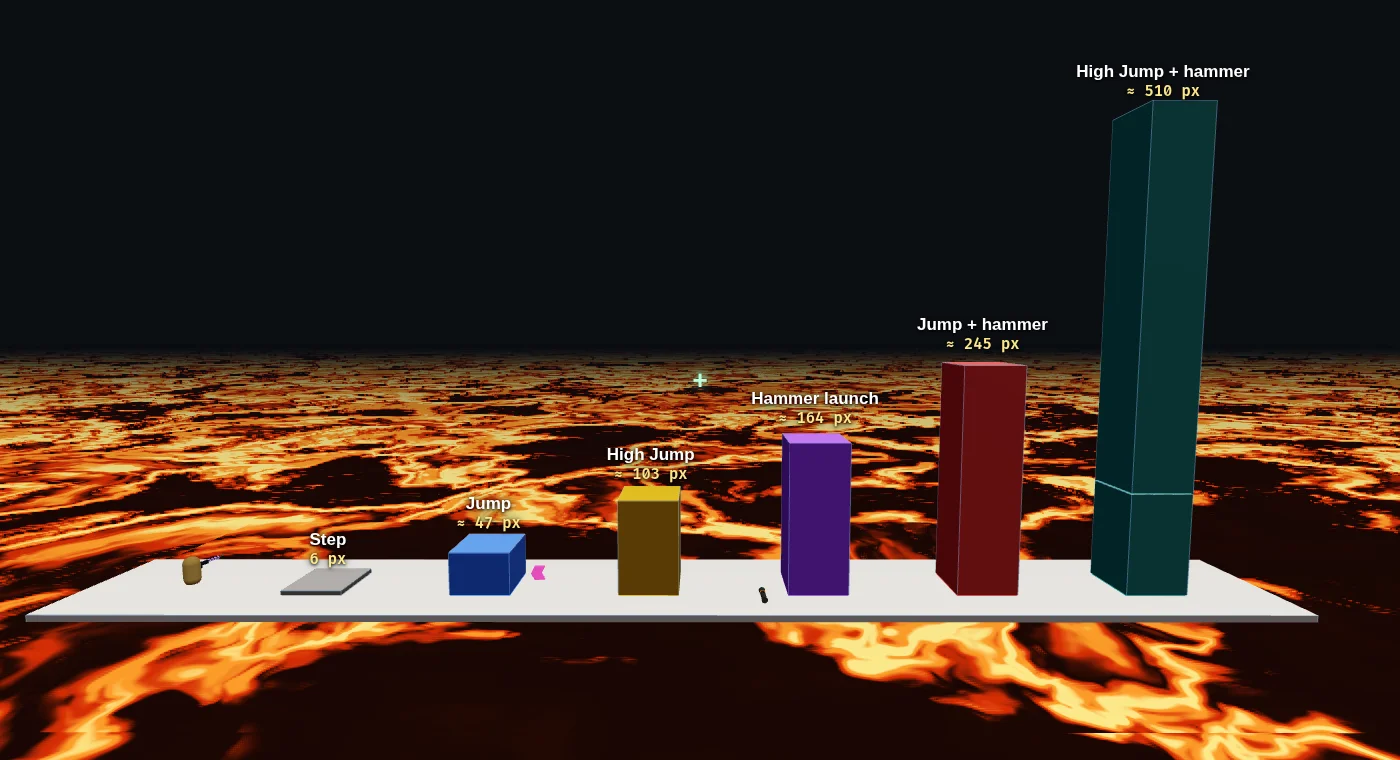
| Move | Reaches |
|---|---|
| Walk up a step | 6 px |
| Jump | 47 px |
| High Jump (pickup) | 103 px |
| Impact Hammer launch (full charge, aimed down) | 164 px |
| Jump, then hammer launch (or a rocket jump) | 245 px |
| High Jump + hammer launch | 510 px |
The plain jump is measured in the game; the others are worked out from it, so leave some margin.
Heights are capped: data-kw-z from 0 to 600 and data-kw-extrusion from 1 to 400. For a tower taller
than 400, stack two boxes with the same footprint: one from the floor up, one on top of it.
Counts a map may have at most:
| Boxes | Spawns | Pickups | Hazards |
|---|---|---|---|
| 5000 | 256 | 512 | 128 |
Attribute reference
Put these on absolutely-positioned elements inside your authored page.
| Attribute | Values | On | What it does |
|---|---|---|---|
data-kw-map |
— (presence) | <body> or root wrapper |
Marks the page as a hand-built map (authored mode). Required for a custom map. It takes no value: players pick Team Deathmatch or Deathmatch when they join, and every map supports both. |
data-kw-node |
solid | platform | island | bridge |
geometry element | Makes the element solid arena geometry. See Node types. |
data-kw-anchor |
ground | floating |
geometry element | ground drops the box to the floor; floating leaves it at its z. |
data-kw-material |
glass |
geometry element | See-through rendering, with solid collision. Blocks players, shots, grenades and blast damage. Omit for the usual opaque material. |
data-kw-z |
number, 0–600 (page-pixel scale) | geometry / spawn / pickup / hazard | Height of the box's top (or the point's height). |
data-kw-extrusion |
number, 1–400 (page-pixel scale) | geometry / hazard | How thick the box is, downward from its top. |
data-kw-team |
red | blue | neutral |
spawn marker | Same as data-kw-spawn-team. On geometry it is recorded but has no effect in the game yet. |
data-kw-spawn |
any id string | marker element | A spawn point at the element's centre. |
data-kw-spawn-team |
red | blue | neutral |
spawn marker | Which team spawns here (overrides data-kw-team). |
data-kw-hazard |
lava | void |
element | A kill zone covering the element's rectangle. |
data-kw-pickup |
see Pickups | marker element | Places a pickup at the element's centre. |
data-kw-ignore |
— (presence) | any element | Hides the element from the bake entirely (geometry and texture). Use it for editor-only labels or a "Play this map" link. |
Notes:
data-kw-zanddata-kw-extrusiontake a plain number; empty or non-numeric is ignored.- A page with any
data-kw-pickupmarks places only those pickups — the automatic random placement is switched off. So if you place one, place them all (including weapons).
Node types
data-kw-node decides how a box behaves underfoot:
| Type | Behaviour |
|---|---|
solid |
A full block: solid sides, stand on top. Your walls, towers and floors. |
platform |
A thin slab you stand on — a ledge or step. Pair with data-kw-anchor="floating" and a data-kw-z to hang it in the air. |
island |
A standalone raised pad, surrounded by drop. Good for jump targets over lava. |
bridge |
A long thin connector between two higher places. |
data-kw-anchor:
ground— the box sits on the floor regardless of itsz. Use it for the main structures.floating— the box stays at itsz, with nothing holding it up. Use it for platforms, bridges and islands you reach by jumping.
Pickups
data-kw-pickup="<kind>" on a small marker div places one pickup at its centre.
| Kind | Effect |
|---|---|
health |
Restores 50 health (can't be taken at full). |
shield |
Soaks the next hit (including blast and hammer knockback). |
haste |
Faster movement for a while. |
highjump |
Higher jumps for a while. |
rapid |
Faster fire for a while. |
rockets |
The Rocket Launcher: a full launcher of 8 rockets, lost on death. |
sniper |
The Sniper Rifle: 3 shots, a scope on right-click, lost on death. |
grenades |
The Grenade Launcher: 6 bouncing grenades, a 2-second fuse or enemy-contact detonation, lost on death. Select with 4. |
Placement tips:
- Mirror weapon pickups through the middle so neither team is closer to one.
- Put the strongest pickups (Shield, the Sniper Rifle) somewhere contested — the centre, or a high perch you have to commit to reach.
Spawns and teams
Players pick the mode when they join, and every map plays both. Mark each spawn with data-kw-spawn="some-id"
on a small div; the spawn is at its centre, at height data-kw-z. Ids just need to be unique (red-1, blue-3
read well).
| Mode | Spawns used | How one is picked |
|---|---|---|
| Deathmatch | All your data-kw-spawn markers (team tags ignored) |
The one farthest from any living opponent |
| Team Deathmatch, both teams tagged | Only spawns with data-kw-spawn-team="red" / "blue", each team its own |
About 45 units from the nearest enemy (safe, but near the fight), pulled toward teammates. If enemies overrun a side, that team spawns on any tagged spawn instead, so spawn camping doesn't work |
| Team Deathmatch, no team tags | Automatic: the map's long axis is split, red at one end, blue at the other, a neutral band in the middle; any standing spot counts | Same rule |
So tagging is optional. Without it, teams start at either end of the map. Tag spawns when you want to place each team's base yourself, and tag both sides: with only one side tagged, the automatic split is used.
Spread deathmatch spawns around the whole map; in a small cluster, players respawn on top of each other.
Where exactly a player appears:
- On top of the highest box under the marker, so a spawn marker over a tower puts players on the tower, and
data-kw-zis only used where there is no box underneath (keep it above any lava there). - Markers outside the page are pulled back to its edge.
- No spawn markers at all: the baker places spawns itself, on the highest, largest boxes. That works, but you lose control over where fights start, so mark your own.
Hazards
data-kw-hazard="lava" (or "void") covers the element's whole rectangle with a kill zone. Give it a
data-kw-z for where its surface sits and a data-kw-extrusion for thickness. Touch it and you die, so hazards
double as the gaps between your platforms — leave open lava under a run of floating islands and the jumps
suddenly matter.
A complete example
A compact team-deathmatch arena: two ground towers, a floating bridge between them, lava underneath, a spawn and a pickup per side, and a contested pickup in the middle.
<body data-kw-map style="margin:0;position:relative;width:1280px;height:512px">
  <!-- The lava floor everything sits over -->
  <div data-kw-hazard="lava" data-kw-z="0" data-kw-extrusion="14"
       style="position:absolute;left:0;top:0;width:1280px;height:512px"></div>

  <!-- Red tower (left) and blue tower (right) -->
  <div data-kw-node="solid" data-kw-anchor="ground"
       style="position:absolute;left:57px;top:128px;width:256px;height:256px"></div>
  <div data-kw-node="solid" data-kw-anchor="ground"
       style="position:absolute;left:967px;top:128px;width:256px;height:256px"></div>

  <!-- A floating bridge joining them across the lava -->
  <div data-kw-node="bridge" data-kw-anchor="floating" data-kw-z="50" data-kw-extrusion="13"
       style="position:absolute;left:334px;top:228px;width:612px;height:64px"></div>

  <!-- One spawn per side -->
  <div data-kw-spawn="red-1"  data-kw-spawn-team="red"  data-kw-z="43"
       style="position:absolute;left:164px;top:213px;width:11px;height:11px"></div>
  <div data-kw-spawn="blue-1" data-kw-spawn-team="blue" data-kw-z="43"
       style="position:absolute;left:1095px;top:213px;width:11px;height:11px"></div>

  <!-- A health pack on each tower, mirrored; the Sniper Rifle fought over in the middle -->
  <div data-kw-pickup="health" style="position:absolute;left:185px;top:156px;width:6px;height:6px"></div>
  <div data-kw-pickup="health" style="position:absolute;left:1095px;top:156px;width:6px;height:6px"></div>
  <div data-kw-pickup="sniper" style="position:absolute;left:640px;top:213px;width:6px;height:6px"></div>

  <!-- An editor-only label the bake ignores -->
  <h1 data-kw-ignore>My Arena</h1>
</body>
Our own maps are fuller, styled examples worth reading: open them and view the page source. Facing Tabs builds two towers from real styled panels, with terraced steps, a bridge, spawn clusters and a full pickup spread; Frost Yard is a small symmetric team yard.
Tips
- Build wide and shallow. ~1280×512 plays best; tall maps put spawns far apart.
- Set
zandextrusionon everything in a hand-built map, so heights are deliberate rather than derived. - Keep gaps bot-sized. A running jump clears about 180 px, but bots only jump gaps up to about 80 px. Wider gaps work for people and leave bots stranded (empty seats fight nobody).
- Keep jumps honest. Space floating platforms within the jump heights in Size and scale; High Jump (about twice as high) and Impact Hammer launches are for the hard-to-reach spots.
- Style the elements however you like. Colours, borders, text and images all bake into the texture, so the
map looks like the page. Only the
data-kw-*tags decide what is solid. - Place every pickup once you place one — the first
data-kw-pickupturns off automatic placement. - Use
data-kw-ignorefor anything that should be visible while editing but not part of the arena.
Publishing your map
A map is just a web page, so you publish it by putting it online. Anywhere public works: GitHub Pages, Netlify, your own site.
- Host your HTML page (with
data-kw-mapon its root) at a publichttps://address. - Open it in your browser, click the Keyboard Warriors extension, and press Create.
- The server bakes your page with your exact geometry. From then on, anyone who opens the extension on that address sees the arena and can join. Share the page's link and people play there.
Players choose Team Deathmatch or Deathmatch when they join; every map supports both (see Spawns and teams).
The bake loads your page the way a visitor would, within limits:
| Limit | Value |
|---|---|
| Page size | 320 × 240 to 4000 × 4000 page pixels (see Size and scale) |
| Time to load | about 20 seconds |
| Requests | GET/HEAD only, at most 300 (images, fonts, stylesheets, scripts) |
| Rebuild | when a new match starts on an arena built in an earlier hour, so edits to your page show up |
Keep the page self-contained and light: inline styles, a few images, no logins or cookie walls in the way.
Testing your map
You test the same way you publish: with the extension. The quick loop while you're building:
- Host the page somewhere public (a free static host is fine) and open it.
- Press Create in the extension, then Start a match and walk your map.
- Edit the page, and give its address a new query string:
…/my-map/?v=2, then?v=3. An arena belongs to its exact address, so each new address is a fresh bake right away. (Once an address has an arena, the extension offers Join instead of Create, and the arena is rebuilt at most once an hour.) Create allows about 5 bakes per 10 minutes per person, so that's your test pace. - When it plays right, share the plain address. That one gets your latest version the next time it's rebuilt.
What to check on each run:
- Tilt view (press T) shows the whole map from above: every box you tagged should be there, at the height you meant.
- Spawns: play both modes; in Team Deathmatch each team should start on its own side.
- Jumps: walk every route you designed against the reach table in Size and scale.
- Bots fill empty seats and use the whole map: if they never reach an area, players probably can't either.